

A terminal-first side project, a real excuse to learn Rust, and a small case for building tools that fit the way you actually work.
I spend most of my day in the terminal.
Not because I am trying to prove a point. It is just the workflow that works best for me.
After years of using Neovim, tmux, and Fish, it is simply the environment where I move fastest. So every time I had to open GitHub just to check whether CI passed, it felt ridiculous.
I push code.
I wait.
I open GitHub.
I click Actions.
I wait again.
I look for a green checkmark or a red X.
Then I go back to the terminal.
One time, that is nothing.
Do that dozens of times a day and it becomes friction. Small friction, yes. But repeated enough times, small friction becomes a tax. And I have very little patience for taxes that should not exist.
So I built gha.
t is a terminal dashboard for GitHub Actions. It lets me stay inside tmux, see what is running, inspect jobs and steps, read logs, and rerun failed workflows without doing the browser dance every twenty minutes.
In the process, I learned Rust, used AI as a real sparring partner, and built something I actually use every day instead of leaving it in a repo to die with a nice README.
The actual problem
The problem was never that GitHub Actions is bad.
The problem was that the interface did not match the way I work.
What I needed was simple:
Did it pass or fail.
What is still running.
What broke.
Can I inspect it quickly.
Can I rerun it right now.
That is it.
The browser can give you all of that. But it gives it to you with extra ceremony. New tab, page load, visual noise, mouse movement, context switch, unnecessary patience. A whole production just to answer a binary question.
I had already used gh run list and gh run watch, and those are useful. But they are still one-shot commands, and the workflow around them is still repetitive. Check, wait, run again, check again. No persistent dashboard. No good view across multiple repositories. No tmux pane quietly sitting there and doing its job.
I wanted something that matched my workflow instead of interrupting it.
Why Rust
I have written TypeScript and Python for years. Infrastructure, frontend, APIs, and a lot of glue code. Rust had been on my list for a long time, but never with enough urgency to force the issue.
And yes, I know there are already tools for this. Probably too many. GitHub already gives you its own interface for Actions, and there are other dashboards and CLI approaches if you want them.
So this was not a case of the world desperately needing one more CI viewer.
I worked on gha partly because I wanted something that fit my workflow better, but also because I wanted a real excuse to learn Rust by building something I would actually use.
That mattered.
Learning a language through toy examples is fine for a weekend. Learning it while building a tool that has to survive real usage is a much better test.
If I am building a terminal tool I want to use every day, I care about a few things:
Fast startup.
Low overhead.
A single binary.
No runtime baggage.
Something that feels solid.
Rust was a good fit for that.
The result is a small binary with no Node, no Python runtime, and no extra drama around it. It starts fast. It feels native to the environment it lives in.
And ratatui made the TUI side much more approachable than I expected. I was able to get useful screens working quickly instead of spending a week pretending I enjoy drawing terminal boxes by hand.
That said, Rust absolutely has a personality.
The compiler is not there to motivate you. It is there to explain, in detail, that your assumptions were wrong.
Ownership, borrowing, and lifetimes are not things you understand because you read a blog post about them. You understand them after the compiler rejects your ideas enough times that you finally become slightly less wrong.
Annoying, yes. Also useful.
Rust does not let you bluff your way through architecture.
The AI part, honestly
I do not want to do the fake purity thing, so here it is plainly.
I used AI heavily.
Not as autopilot. Not as “vibe coding.” And definitely not as a substitute for judgment.
I used it as a sparring partner.
I made the architecture decisions. I chose the direction. I reviewed the code. The AI helped me move faster, challenge weak ideas, and debug problems that would have taken longer alone.
And no, it was not magic.
It got things wrong too.
At one point, the fzf integration broke because of ANSI escape code behaviour that fzf quietly strips. That was not caught on the first pass. We had to work through it. The same thing happened with terminal recovery edge cases, selection state, and a few pieces of logic that technically worked but were still wrong in practice.
The project went through three audit cycles. Each one found real issues.
A missing panic hook that could leave the terminal in a bad state.
Selection jumping when data refreshed.
Error messages disappearing too fast.
Hardening gaps around timeouts, pagination, and config validation.
Polish issues in log viewing and interaction hints.
That is the part I care about.
Not whether AI touched the code.
Whether the final result survives contact with reality.
I know what the tool does. I know why it is structured the way it is. I know what trade-offs I made. And I understand the code well enough to maintain it without needing to interrogate my past self.
That is real enough for me.
Some people will still say this is not “real” programming. Fine. They are free to defend that position, and that is fine too. I am just adapting to a new way of building that is clearly here to stay.
I would still rather ship useful software.
Why I did not just switch to another IDE
This is usually where someone asks why I do not just use VS Code, Cursor, or whatever the current AI tool of choice happens to be.
The answer is simple.
I already have a workflow that works.
I have spent years shaping it. Neovim, tmux, Fish, terminal tools, keyboard-first navigation, all of it. That investment compounds. It changes how you move, how quickly you inspect a codebase, how easily you jump between tasks, and how little friction there is between thought and action.
So from my perspective, switching is not “trying something new.”
It is throwing away years of muscle memory and replacing it with a different set of compromises I did not ask for.
This project exists because I wanted one more part of that workflow to stop being annoying.
What gha actually does
gha has two main modes.
The first is a live TUI dashboard.
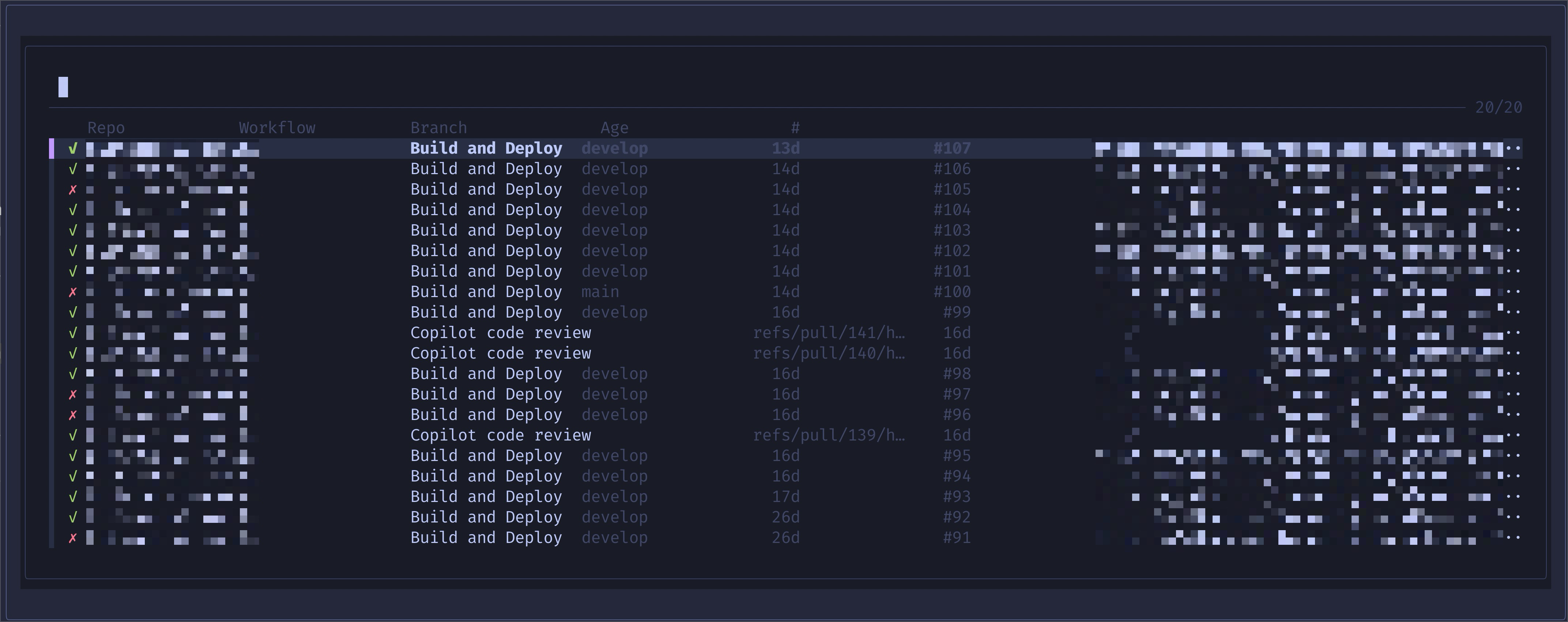
It polls GitHub Actions, shows workflow runs across repositories, and lets you drill down into jobs and steps. You can inspect logs, rerun failed workflows, and keep the whole thing open in a tmux pane while you work.
The polling is adaptive. Faster when things are active. Slower when everything is idle. Which is nice, because not every tool needs to behave like it was raised on caffeine and panic.
The second is an fzf picker built for tmux popups.
I can trigger it with a keybinding, get a floating list of runs, drill into jobs, and jump where I need to go without breaking flow. It opens fast, does the job, and leaves. A surprisingly rare quality in software.
It also supports themes I actually like, including Catppuccin Mocha, Tokyo Night, and Tokyo Night Storm, and it reads config from ~/.config/gha/config.toml so I do not have to keep passing flags around like I am being punished for wanting preferences.
Could I have built more? Yes.
Did I want to? No.
That is part of the point.
There are already plenty of CI dashboards. I did not want to build a platform, a productivity ecosystem, or some future SaaS with pricing tiers and a painfully cheerful landing page.
I wanted to build my tool.
So I did.
What I learned
1. Build around your real workflow, not an imaginary one
This project got better as soon as I stopped thinking about what a dashboard is supposed to be and focused on what I actually needed several times a day.
A lot of bad software comes from solving the respectable version of the problem instead of the real one.
2. Good architecture saves more time than clever code
One of the best decisions here was keeping the structure simple. Async tasks feeding a channel, main thread owning application state, clear boundaries between fetching, events, and rendering.
That held up as features were added.
No dramatic rewrites. No existential refactor crisis. Just a structure that kept working.
That matters more than language choice.
3. Rust is demanding, but it pays you back
Rust slowed me down at first. A lot.
But most of that friction was not arbitrary. It was forcing precision. Once I adjusted to that, it started feeling less like punishment and more like enforced discipline I probably needed anyway.
Not fun, exactly. But useful. Which is often better.
4. The first version is rarely the real version
The first build worked, but it was not strong enough.
The audits changed that.
This is also why I find the shallow AI conversation a bit boring. Generating a first pass quickly is not the interesting part. The interesting part is whether you can review it, challenge it, refine it, and make it reliable.
That still takes judgment.
5. Not every missing feature deserves to exist
I originally wanted real-time log streaming.
GitHub’s API does not make that especially elegant.
I could have forced it. Added complexity. Pretended the workaround was worth it.
Instead, I decided not to.
Completed-job log viewing solved most of the problem for much less complexity and much less future regret.
That was the right decision.
The unglamorous truth
This is not a startup.
It is not a product strategy.
It is not a revolutionary new layer in the developer tooling stack.
It is a tool that saves me a bit of time, many times a day, and removes a kind of friction I got tired of tolerating.
That was enough reason to build it.
And honestly, that is one of the best reasons to make software.
brew tap LockeAG/tap
brew install gha
If you want to read the code first:
If you try it and it is useful, great.
If not, that is also fine.
Just do not ask me to add a web UI.